
CalDigit TS4 Thunderbolt 4 Dock
18 high-speed ports, robust 98W charging, and 8K display support deliver premium connectivity with minor thermal trade-offs.
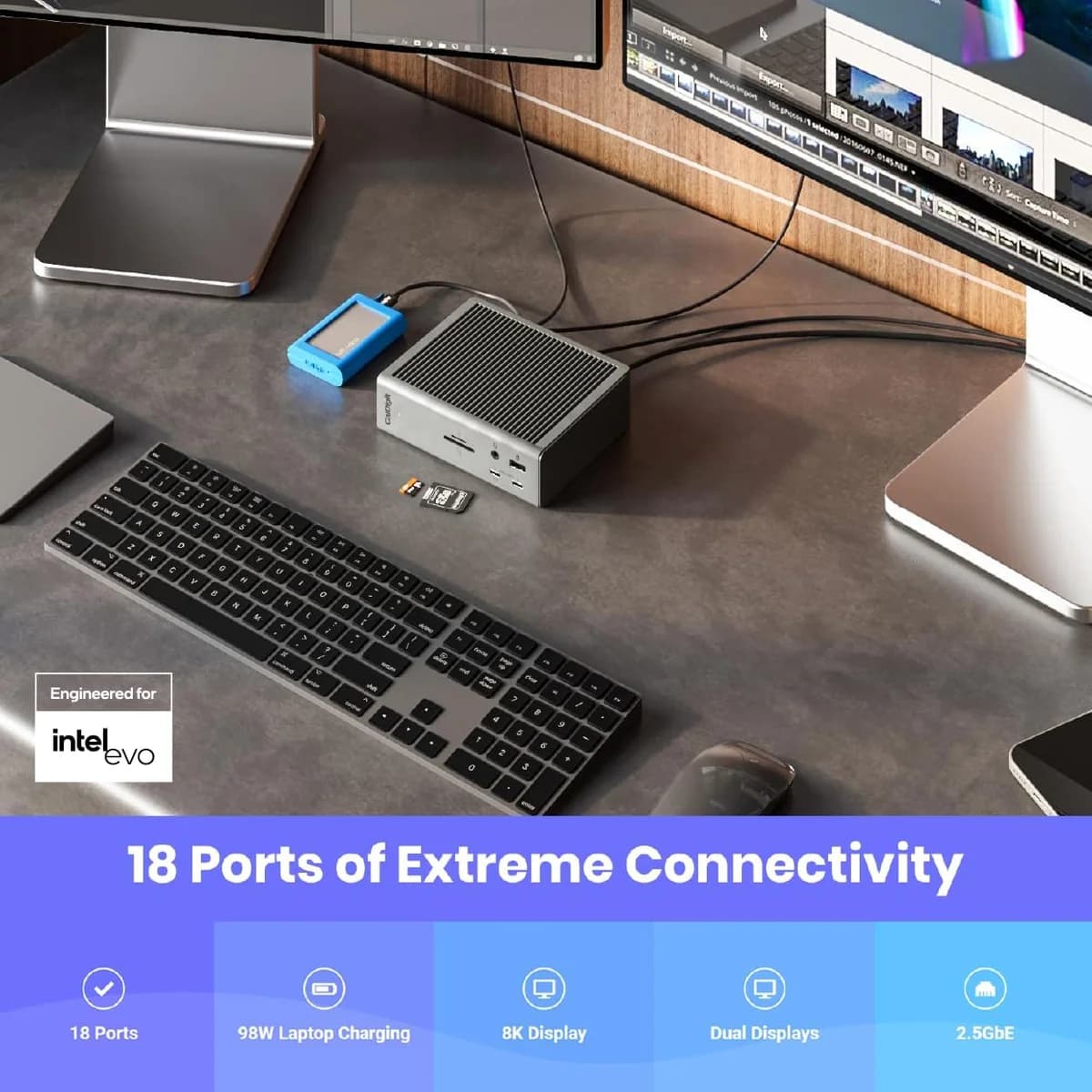
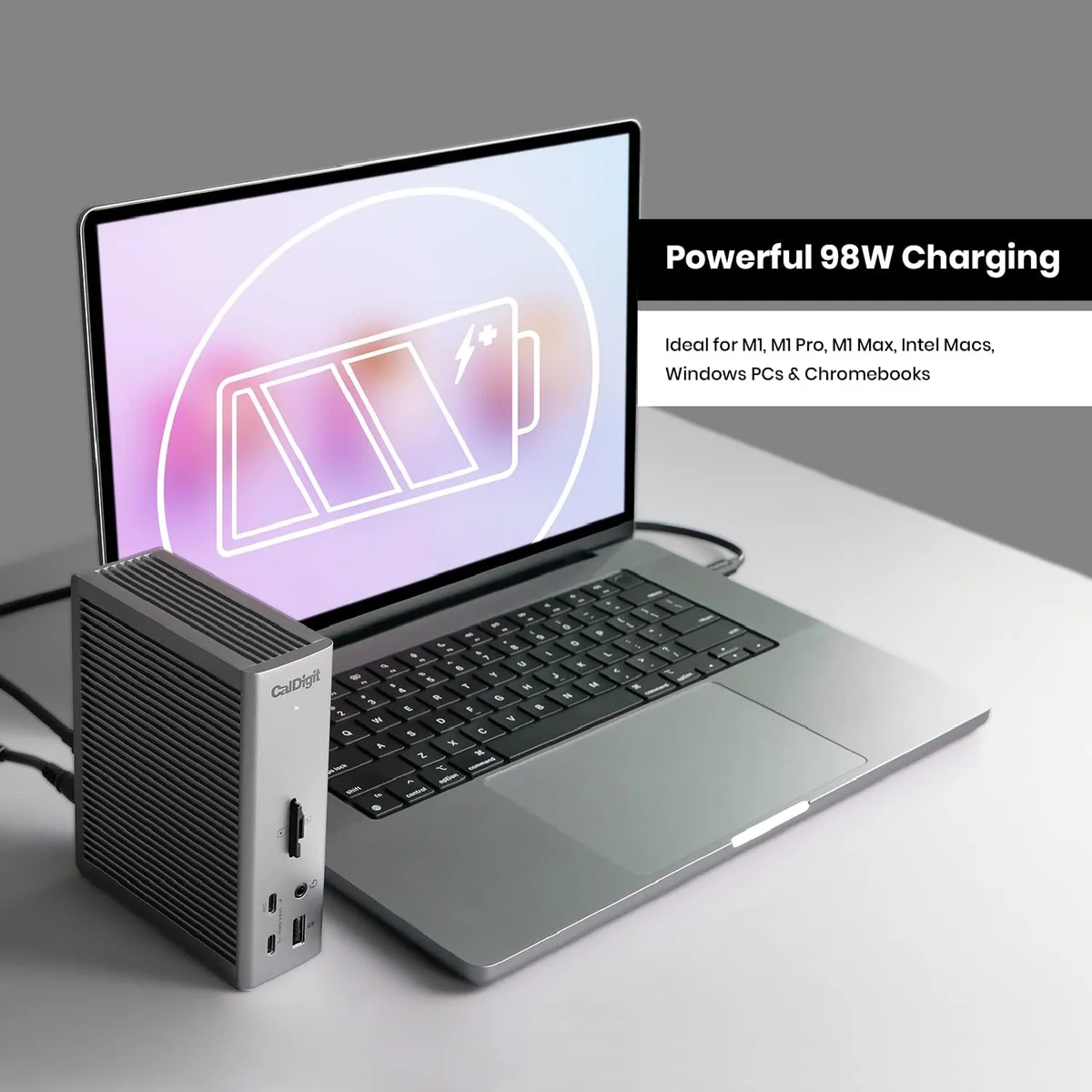
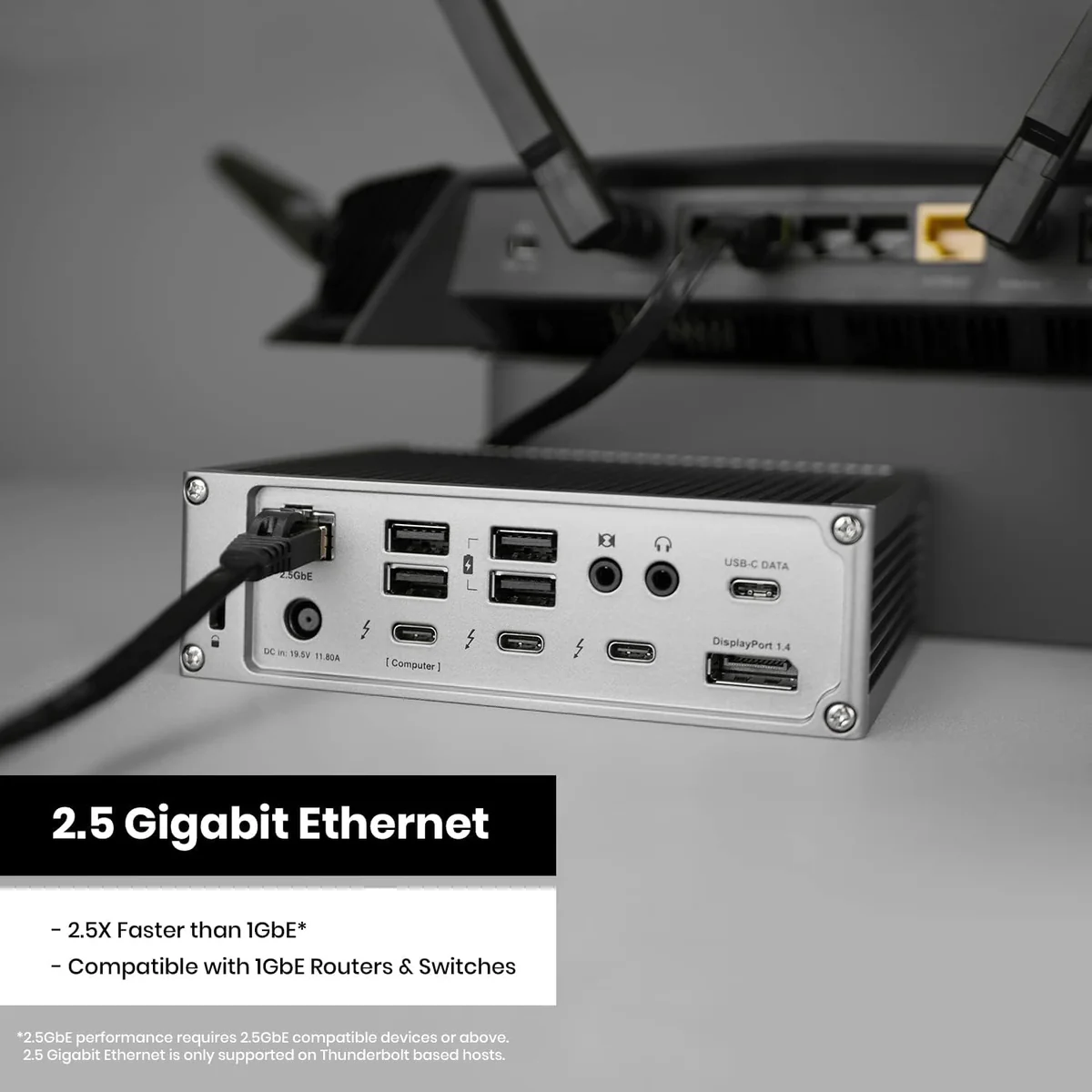
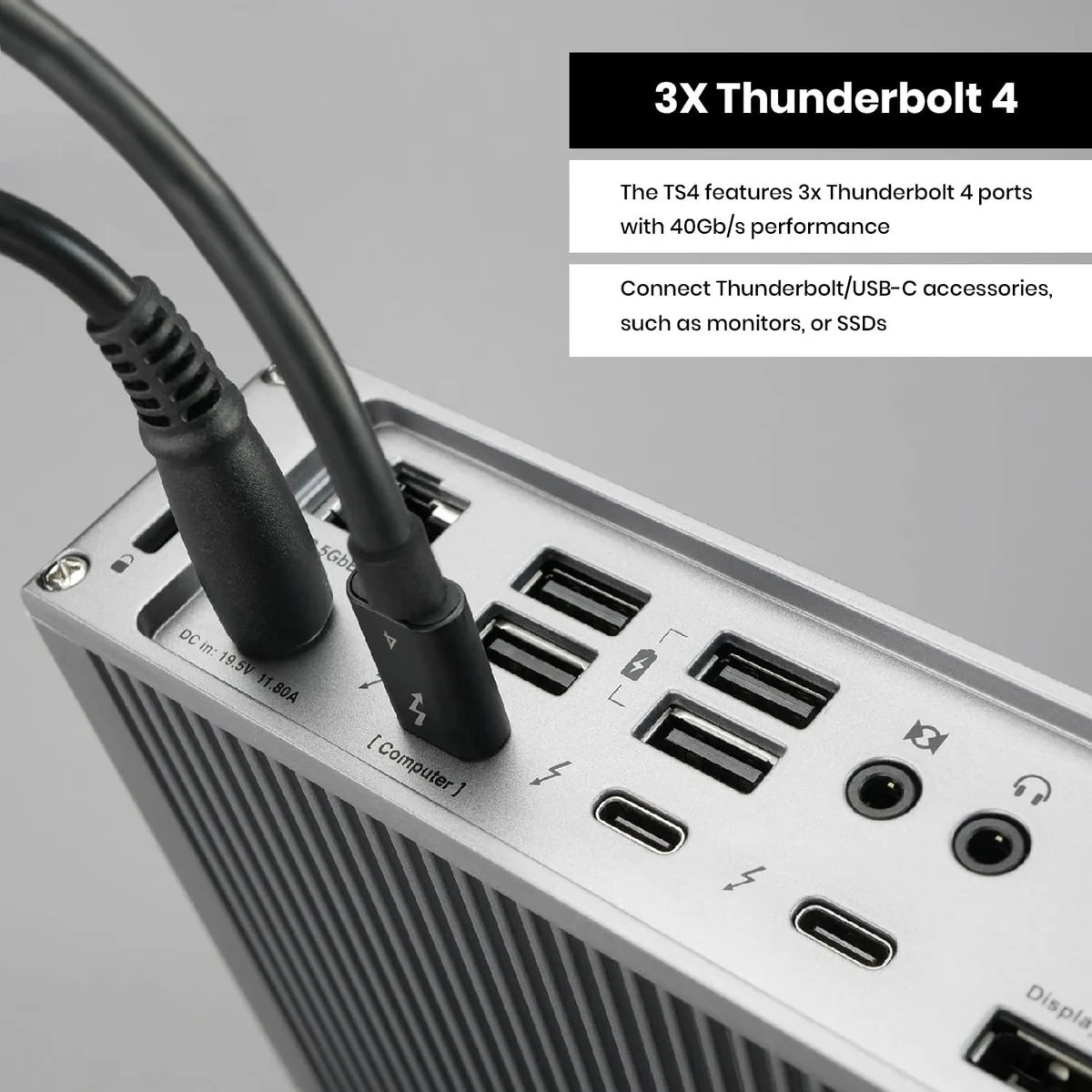
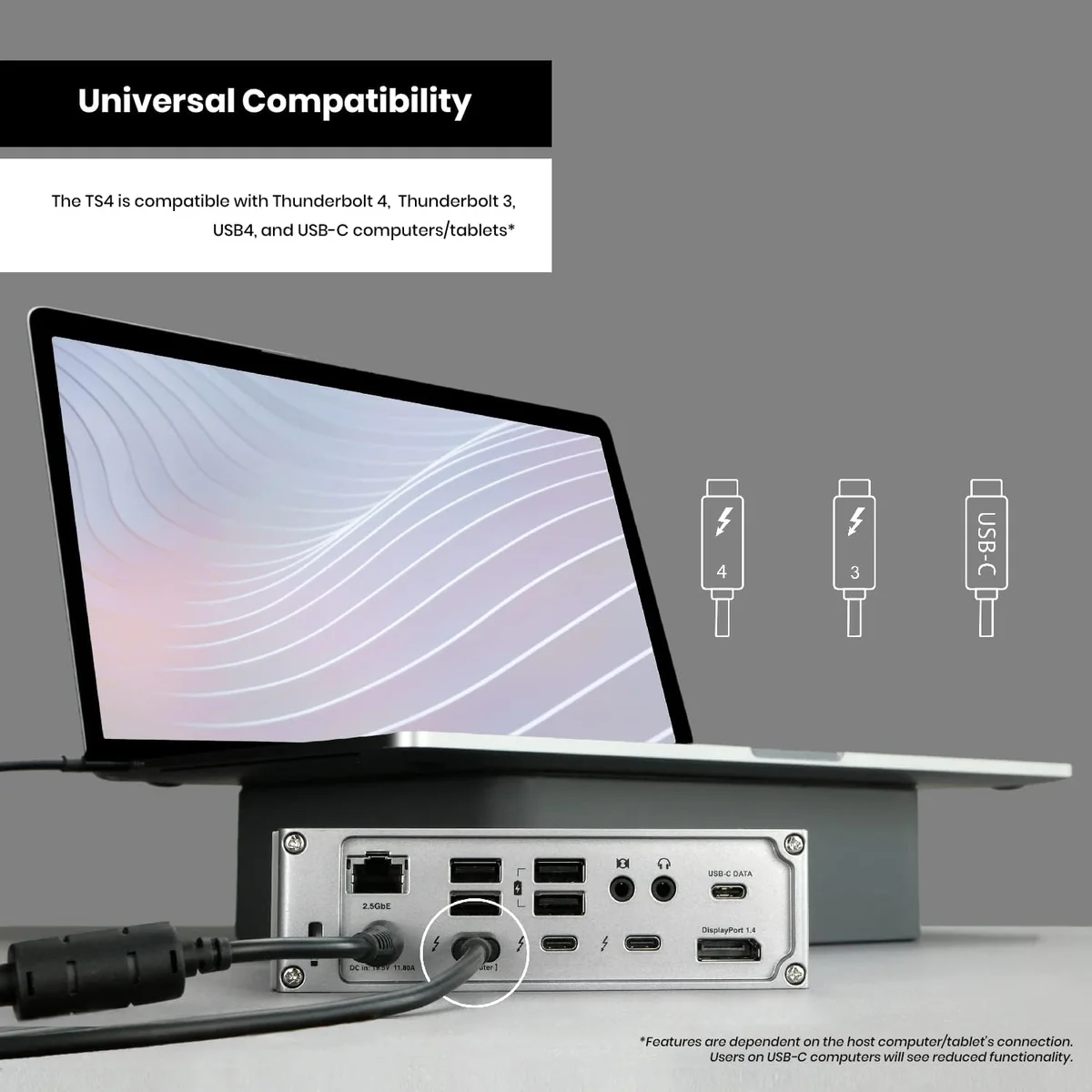
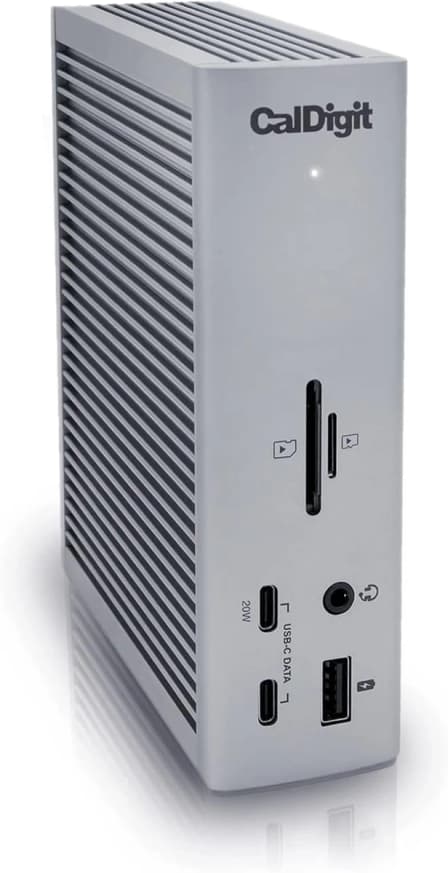
The CalDigit TS4 Thunderbolt 4 Dock is the ultimate desk commander for pros drowning in cables and devices. With 18 high-speed ports including triple Thunderbolt 4 connections, it transforms any laptop into a powerhouse workstation. Experts praise its robust 98W charging and native DisplayPort 1.4, delivering crisp visuals up to 8K resolution—though users note the dock can run warm under heavy loads. Its premium price matches serious specs like dual UHS-II card readers and blazing 2.5GbE networking, offering future-proof versatility that justifies the investment. A bulky power brick and occasional quirks don’t dull its shine, making this dock a commanding centerpiece on your desk with undeniable staying power.
Find Yours
What is the main purpose of your external component?
Answer to find your best matches.

The Scoreboard
Does this improve your life? Considers, health, habits, and environmental impact.
Benefits
Consolidates peripherals and charging into one cable, reducing clutter versus juggling multiple chargers.
Robust 98W delivery via high‑wattage PSU keeps laptops charged and reduces interruptions.
Extensive ports and dual card readers speed workflows, lowering mental friction versus basic hubs.
Aluminum chassis and solid components lengthen usable life, reducing replacement needs versus cheap plastic.
2.5GbE, DisplayPort and Thunderbolt 4 support reduce adapter juggling and future upgrade churn.
Trade-Offs
Bulky high‑wattage PSU produces heat and physical clutter, increasing desk discomfort and disposal burden.
Sustained Thunderbolt throughput heats-connected SSDs, potentially shortening portable drive lifespan during heavy transfers.
Complex electronics and metal parts imply mining and e‑waste impacts, especially versus modular, repairable designs.
Firmware quirks and occasional peripheral hiccups create troubleshooting time, frustration, and disrupted focus.
 Alternatives


Join the Circle
Where real meets deal
Know what's worth buying-and when.
Tips, special offers, and rewards for buying and sharing.

Publications
8 LEADING PUBLICATION REVIEWS

Dan Seifert from The Verge highlights the CalDigit TS4 Thunderbolt 4 Dock as the most capable and well-equipped dock currently available, praising its extensive port selection, compact design, and broad compatibility with Thunderbolt 4, Thunderbolt 3, and USB-C devices. He emphasizes the convenience of consolidating multiple peripherals and charging through a single cable, making it ideal for home office setups. Seifert’s hands-on testing reveals excellent performance across a variety of devices, including high-resolution displays and fast external drives, though he notes some minor issues with specific peripherals like the Thunderbolt SSD and Elgato CamLink 4K that required troubleshooting. The dock’s high price and large power brick are acknowledged as significant drawbacks, and he suggests that upgrading from the previous TS3 Plus may not be worthwhile. Overall, Seifert’s tone is measured but positive, presenting the TS4 as a premium, reliable solution for users seeking the ultimate Thunderbolt dock experience.
By Dan Seifert
Simon Jary from Tech Advisor highlights the CalDigit TS4 Thunderbolt 4 Dock as a standout successor to the popular TS3 Plus, praising its impressive array of 18 high-end ports, including a rare 2.5Gb Ethernet port and a powerful 230W power supply capable of charging most laptops at 98W. The review emphasizes the dock’s flexible design, allowing both vertical and horizontal placement, and applauds thoughtful details like the rear placement of the upstream Thunderbolt port for a cleaner desk setup. While the inclusion of a dedicated DisplayPort is seen as convenient for most users, it comes at the cost of one fewer downstream Thunderbolt 4 port, which may disappoint some power users. The TS4’s dual card readers, faster USB ports, and backward compatibility with Thunderbolt 3 and USB-C devices add to its appeal. Although priced at the higher end, the TS4 is deemed the best Thunderbolt 4 dock tested, making it a worthy upgrade for new buyers and a compelling option for those seeking top-tier connectivity and power.
By Simon Jary
Glenn Fleishman from Macworld highlights the CalDigit TS4 Thunderbolt 4 Dock as an exceptionally well-designed and feature-rich hub, ideal for Mac users seeking extensive connectivity. Praising its impressive array of 18 thoughtfully chosen ports—including multiple USB-C and Type-A jacks, 2.5Gbps Ethernet, and dual memory card slots—he emphasizes the dock’s ability to serve as both a powerful port extender and a robust charging station with up to 98W laptop power delivery. Fleishman appreciates the inclusion of a native DisplayPort, which simplifies multi-monitor setups without sacrificing Thunderbolt ports. While he notes the dock only adds a net gain of one Thunderbolt 4 port, this minor limitation does not detract from its overall utility for high-end desktop workstations. The review conveys a tone of genuine enthusiasm tempered with measured analysis, offering unique insights into real-world usability, power management, and compatibility nuances, ultimately positioning the TS4 as the definitive Thunderbolt dock for demanding Mac users.
By Glenn Fleishman
Cale Hunt from Windows Central highlights the CalDigit TS4 as the premier Thunderbolt 4 docking station, praising its unmatched port selection and robust power delivery of up to 98W. He emphasizes the dock’s solid aluminum build, thoughtful design for both vertical and horizontal use, and broad compatibility across Windows, Mac, and ChromeOS systems. Unique features like the inclusion of a native DisplayPort 1.4 port and simultaneous use of UHS-II SD and microSD card readers stand out as practical advantages. While Hunt notes some compatibility hiccups with less common laptops and the tradeoff of losing one Thunderbolt 4 port to accommodate DisplayPort, these are framed as minor issues relative to the dock’s overall excellence. The $360 price tag is acknowledged as steep but justified by the TS4’s extensive capabilities. Hunt concludes that for users with Thunderbolt 4 laptops seeking the best connectivity and power, the TS4 is the top choice, though availability remains limited due to high demand.
By Cale Hunt
Andrew O'Hara from AppleInsider highlights the CalDigit TS4 Thunderbolt 4 Dock as a standout accessory, praising its impressive 18-port array, robust 98W power delivery, and versatile design that supports both vertical and horizontal orientations. The dock excels in real-world use, notably outperforming the MacBook Pro’s built-in SD card reader speeds and enabling convenient MagSafe charging via a front USB-C port. O'Hara emphasizes the TS4’s backward compatibility with Thunderbolt 3 and USB4 devices, making it a future-proof choice. While the dock lacks an HDMI port—a minor drawback given the prevalence of HDMI—the reviewer considers this a small trade-off for the extensive connectivity and power options offered. The TS4’s ability to support dual 6K displays and even an 8K display (though unsupported on Mac) further cements its position as a top-tier Thunderbolt dock. Overall, the review conveys strong enthusiasm and confidence, calling the TS4 “the undisputed king of Thunderbolt 4 docks.”
By Andrew O'Hara
Gerald Lynch from iMore highlights the CalDigit TS4 Thunderbolt 4 Dock as a powerhouse of connectivity, praising its extensive array of 18 ports, robust 98W charging, and compact yet sturdy design. He expresses clear enthusiasm for its ability to handle a wide variety of devices simultaneously, calling it the best Thunderbolt dock he has used. Lynch appreciates the dock’s convenience, speed, and versatility, noting solid real-world performance and thoughtful port placement. However, he also points out some drawbacks, including the high price, absence of an HDMI port, a bulky power brick, and occasional temperamental behavior with certain Thunderbolt displays. Despite these caveats, Lynch considers the TS4 the most complete Thunderbolt 4 dock available, ideal for users with demanding workflows who need extensive connectivity and power. His review balances excitement with measured critique, offering unique insights into practical use and competition, ultimately recommending the TS4 as a premium but worthwhile investment for serious desktop setups.
By Gerald Lynch
Rael Hornby from Laptop Mag highlights the CalDigit TS4 Thunderbolt 4 Dock as a standout accessory that transforms minimalist laptops into fully equipped workstations. Praising its exceptional port variety—including multiple Thunderbolt 4, USB-C, USB-A, SD card readers, and 2.5Gb Ethernet—the review emphasizes the dock’s robust 98W power delivery that sustains heavy multi-device setups without faltering. The sleek, compact design and thoughtful features like offline charging and stable placement further enhance its appeal. However, Hornby notes the premium $399 price tag as a significant consideration, especially since the dock lacks native HDMI output, requiring additional adapters that add to the cost. Despite this, the TS4’s reliable performance, cool operation under load, and versatile connectivity make it a top-tier choice for professionals seeking a powerful, all-in-one docking solution. The review balances enthusiasm with practical caveats, offering a nuanced perspective on value versus features.
By Rael Hornby
Cale Hunt from XDA Developers highlights the CalDigit TS4 Thunderbolt 4 Dock as a top-tier, powerful docking solution that excels in port variety, charging capacity, and build quality. Praising its 18 ports, robust 98W charging, and versatile aluminum design that supports both horizontal and vertical orientations, Hunt emphasizes the TS4’s suitability for power users seeking maximum connectivity. While acknowledging its premium $400 price tag, the review frames the cost as justified by the dock’s performance and extensive features. Hunt notes minor trade-offs, such as the reduction to two downstream Thunderbolt 4 ports to accommodate DisplayPort 1.4, which may not suit all workflows. The review also provides practical insights from months of hands-on use across multiple laptops, including initial compatibility hiccups resolved over time. Comparisons to alternatives like Kensington’s SD5780T and CalDigit’s Element Hub offer balanced context. Overall, Hunt conveys measured enthusiasm, positioning the TS4 as the best Thunderbolt 4 dock for users who prioritize power and port selection without compromise.
By Cale Hunt

YouTube
8 LEADING EXPERT & INFLUENCER REVIEWS
 Learn Linux TV
Learn Linux TV praises the CalDigit TS4 Thunderbolt 4 Dock for its extensive port selection, powerful 98W charging, and excellent support for high-refresh-rate ultra-wide displays on Linux and Windows. However, he notes a critical limitation: USB ports don’t work on MacBooks despite Thunderbolt compatibility, making it unsuitable for Mac users.
9to5MacJeff Benjamin from 9to5Mac praises the CalDigit TS4 Thunderbolt 4 Dock as a significant, refined upgrade over the TS3 Plus, highlighting its 18 ports, dual UHS-II SD card readers, 2.5GbE Ethernet, and 98W charging. He notes improved compatibility, versatile display support, and thoughtful design, while mentioning minor drawbacks like price, power limits for some MacBook Pros, and an always-on LED. Overall, he enthusiastically recommends it as the best all-around dock for Mac users.
ShortCircuitShortCircuit enthusiastically praises the CalDigit TS4 Thunderbolt 4 Dock for its extensive 18-port connectivity, powerful 98W charging, and unique 2.5 Gigabit Ethernet, ideal for high-speed workflows. He highlights thoughtful design like front SD/microSD readers and cable management, while noting the lack of native HDMI but easy adapter solutions.
Wayne FoxWayne Fox provides a balanced, moderately positive review of the CalDigit TS4 Thunderbolt 4 Dock, praising its extensive port selection, powerful 98W charging, and superior expandability compared to competitors like the OWC dock. He notes design quirks, such as the front-facing host input and a USB 2.0 front port, but highlights the TS4’s strong multi-display support and future-proof 2.5GbE Ethernet as key advantages for power users.
The Chris ReviewThe Chris Review praises the CalDigit TS4 Thunderbolt 4 Dock for its robust build, extensive port selection—including SD/microSD slots, multiple USB-C/A ports, DisplayPort, and Ethernet—and seamless setup with a MacBook. He appreciates the convenience of one-cable docking and stable performance, though notes some unused ports and minor uncertainties about specific audio jacks. Overall, he expresses clear satisfaction with the dock’s functionality and workspace integration.
Jacob GagoJacob Gago praises the CalDigit TS4 Thunderbolt 4 Dock for its compact design, extensive 18-port connectivity—including dual SD and microSD card readers—and powerful 98W charging. He highlights its 2.5GbE Ethernet and rear host connection for a cleaner setup. While noting its higher price and some design preferences, he favors the TS4’s modern features and future-proofing over the OWC dock.
Messenger Bag MediaMessenger Bag Media enthusiastically praises the CalDigit TS4 Thunderbolt 4 Dock for its extensive 18-port selection, powerful 98W charging, and seamless one-cable workflow ideal for videographers and media professionals. The reviewer highlights real-world use with multiple high-speed drives and monitors, noting only minor drawbacks like the bulky power brick and bright indicator light.
Try and ByteTry and Byte praises the CalDigit TS4 Thunderbolt 4 Dock for its expanded port selection, increased 98W charging, and new offline charging feature, enhancing convenience for Mac and USB-C users. While impressed overall, they note minor macOS sleep-related display issues and see the TS4 as a worthwhile future-proof upgrade over the TS3 Plus.

Social
1 INFLUENCER REVIEW
 Omar Farook
Omar Farook raves about upgrading from the CalDigit Element Hub to the TS4 Thunderbolt 4 Dock, emphasizing its vastly improved port selection, including dual SD card slots and superior handling of high-quality webcam video. He highlights the TS4’s ability to connect his entire MacBook Pro setup through a single USB-C cable, praising its seamless performance and expanded functionality. Overall, Omar’s review is highly enthusiastic, portraying the TS4 as a powerful, versatile dock that meets evolving peripheral needs with ease. He strongly recommends it for users seeking a robust, all-in-one docking solution, especially those requiring multiple high-speed connections and reliable device support.

Store Reviews
CUSTOMER REVIEWS FROM 1 STORE
Amazon users widely praise the CalDigit TS4 Thunderbolt 4 Dock for its robust build quality, extensive port selection, and seamless integration with MacBook Pro setups. Many highlight how the dock transforms a MacBook into a full desktop workstation with a single cable, supporting multiple high-speed USB-C and USB-A connections, dual 4K displays, and fast 2.5Gb Ethernet that unlocks full internet speeds. Reviewers appreciate the dock’s ability to deliver up to 98W charging power while maintaining ample bandwidth for peripherals, making it a future-proof solution for power users. Several users emphasize the dock’s compatibility beyond Macs, successfully connecting Windows laptops like Dell and HP models, which broadens its appeal. Unique insights include advice on managing heat by not overloading the dock’s power capacity and ensuring the use of Thunderbolt 3 or 4 cables rated for high wattage to achieve optimal performance. Some users report occasional USB-C SSD disconnections after sleep mode and initial Ethernet setup quirks that require manual network device adjustments, but these issues do not overshadow the overall reliability. While a few customers mention the dock can run warm under heavy loads and caution against pushing it beyond its power limits, most find the investment worthwhile for the clean, efficient workspace it enables. Amazon reviewers consistently recommend the CalDigit TS4 as a premium, versatile docking station that resolves common connectivity headaches, especially for Mac users juggling multiple devices.
4.1 Stars / Many verified reviews

Forum Reviews
CUSTOMER REVIEWS FROM 1 FORUM
Reddit users generally view the CalDigit TS4 Thunderbolt 4 Dock as a powerful and well-designed device, praised for its robust performance, extensive port selection, and reliable compatibility with both Mac and Windows systems. Many appreciate its ability to handle multiple high-resolution monitors and fast data transfer, with responsive customer support noted positively. However, some users report intermittent USB connectivity issues, occasional instability, and firmware-related quirks, particularly when upgrading from older models. While new shoppers often highlight its advanced features and future-proofing, upgraders sometimes express frustration over initial bugs and prefer the stability of previous versions, reflecting a mixed but overall cautiously optimistic sentiment.
Many comments

In-Depth Review

Highlights
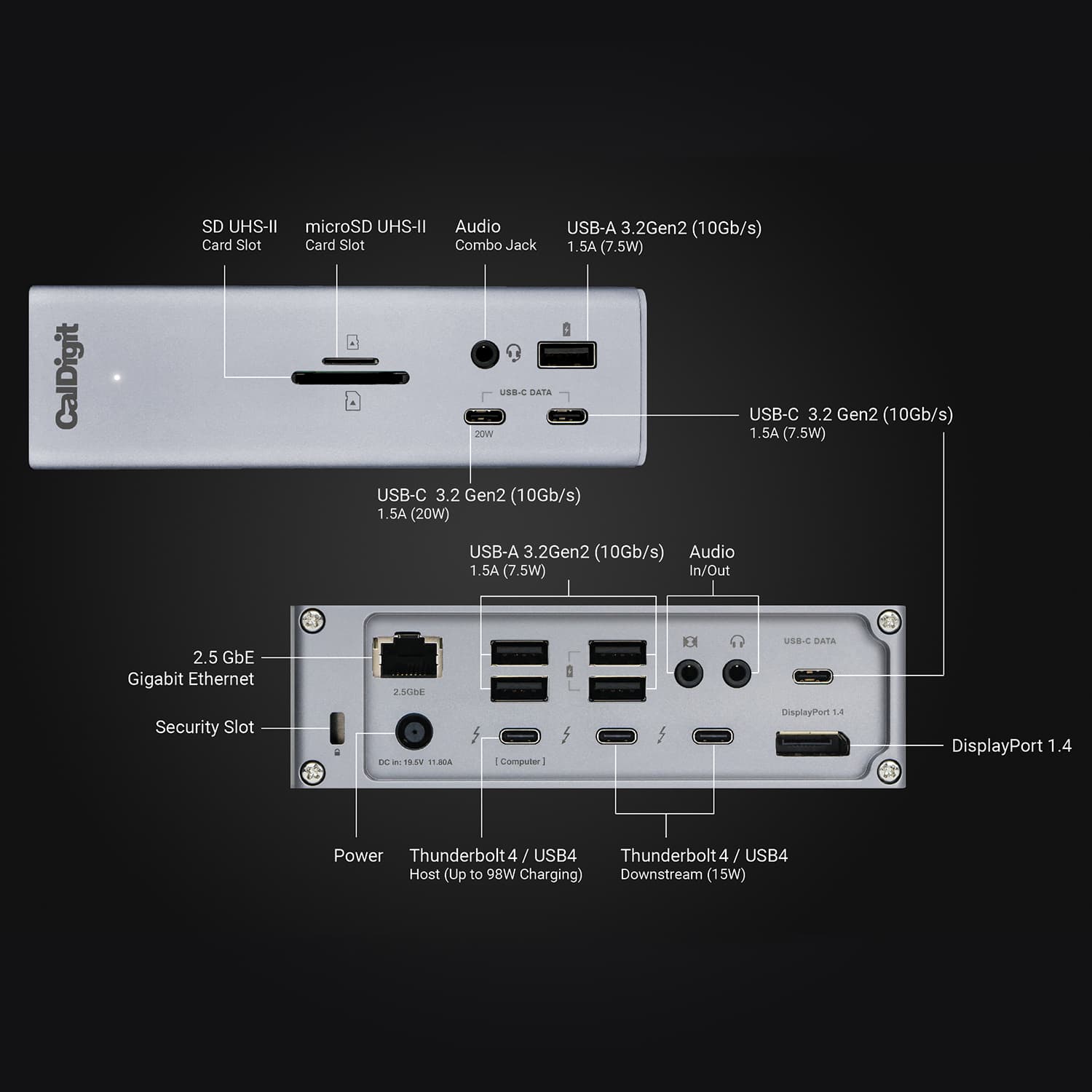
- •Port density18 total high‑speed ports
- •Power deliveryUp to 98W to host
- •Display capabilityNative DisplayPort 1.4; 8K/6K support
- •2.5GbE networkingBuilt‑in 2.5 Gigabit Ethernet
- •UHS‑II card readersSD and microSD UHS‑II slots
- •Build and serviceabilityAluminum chassis; detachable cable/PSU

Considerations
- •Intermittent reliabilityReports of random disconnects/failures
- •Thermal behaviorRuns warm; can get hot
- •Ethernet instabilitySome units had non‑working 2.5GbE
- •Display adapter needNo native HDMI; active adapters required
- •Power brick sizeLarge 230W external supply
- •Peripheral compatibilitySome older USB hubs unsupported
CalDigit has built a strong reputation for crafting docking stations that blend power and versatility, and the TS4 Thunderbolt 4 Dock steps confidently into the premium category. Designed to transform workstations with 18 high-speed ports including three Thunderbolt 4 connections, this dock caters to professionals juggling multiple devices, displays, and data streams simultaneously. It promises robust 98W power delivery backed by a hefty external PSU, though users should keep an eye on its thermal behavior under heavy loads. Native DisplayPort 1.4 support enables crisp visuals up to 8K, while integrated 2.5GbE networking boosts wired connection speeds beyond standard gigabit Ethernet. Its solid aluminum build offers durability suited for demanding environments, paired with broad compatibility across macOS, Windows, and Chrome OS systems. Whether you’re a content creator or multitasking maestro seeking streamlined connectivity without compromise, exploring these standout features will reveal why this dock earns its place at the top of many desks—and maybe yours next too!
Port Selection & Bandwidth
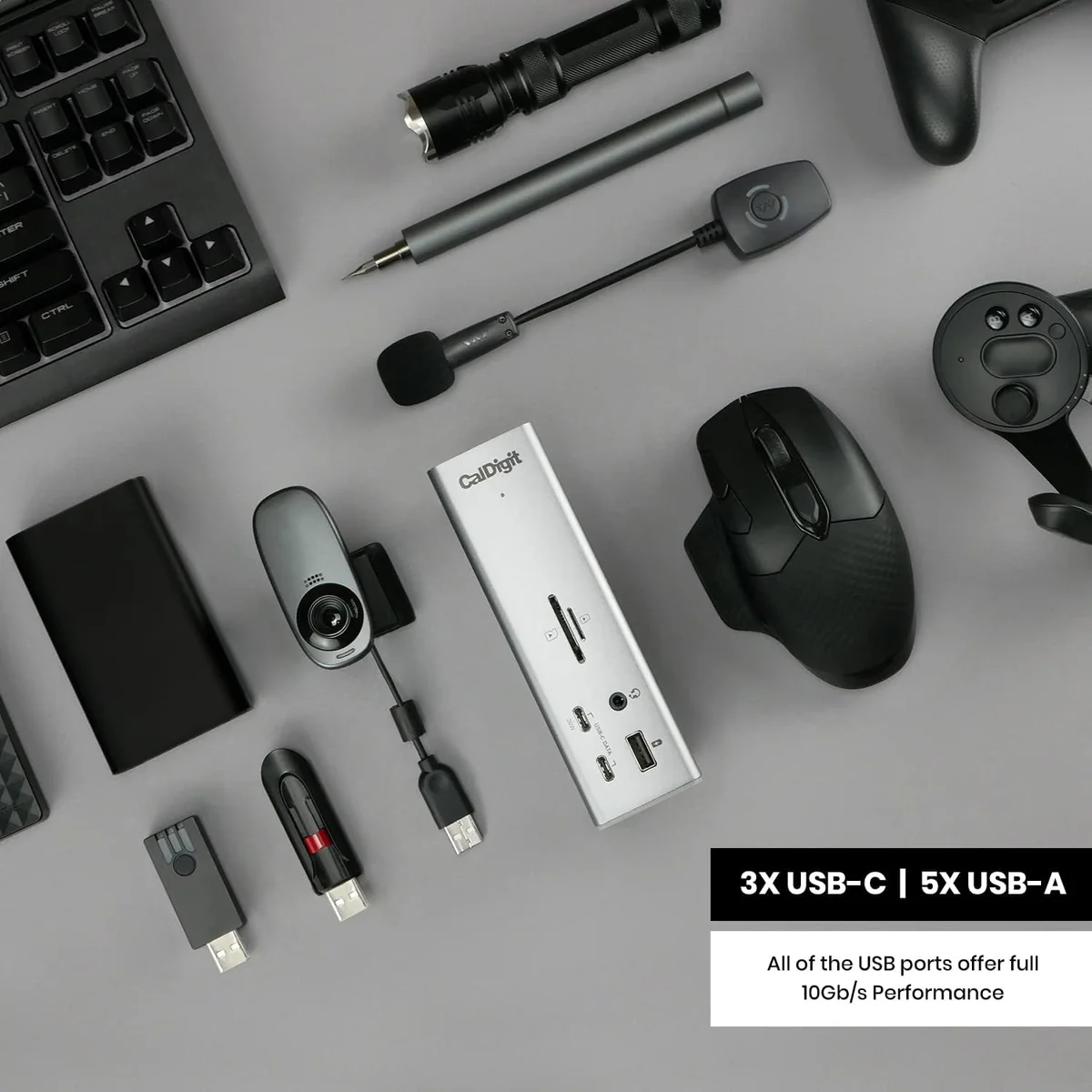
The dock dazzles with 18 ports, including 3 Thunderbolt 4 and 8 USB-C/A ports boasting full 10Gb/s data speeds. This abundance means you can connect multiple high-speed drives, peripherals, and displays simultaneously without bandwidth bottlenecks. Users highlight the convenience of front-facing USB-C and card readers for quick access. However, some note that heavy simultaneous use risks overheating, a reminder to respect its power limits. The port variety cements it as a versatile hub for complex workflows while supporting modern connectivity standards like USB4 compatibility.
Power Delivery & Thermal Behavior
Delivering up to 98W charging to your laptop plus downstream power on various ports, this dock keeps devices juiced efficiently during heavy multitasking sessions. Experts applaud its robust external 230W PSU, ensuring stable energy delivery even under load. That said, users report the dock runs warm or hot when fully loaded—typical but noteworthy for long-term reliability concerns. Passive cooling via ribbed aluminum helps dissipate heat gracefully without fan noise—a thoughtful design choice balancing performance with quiet operation.
Build Quality & Materials
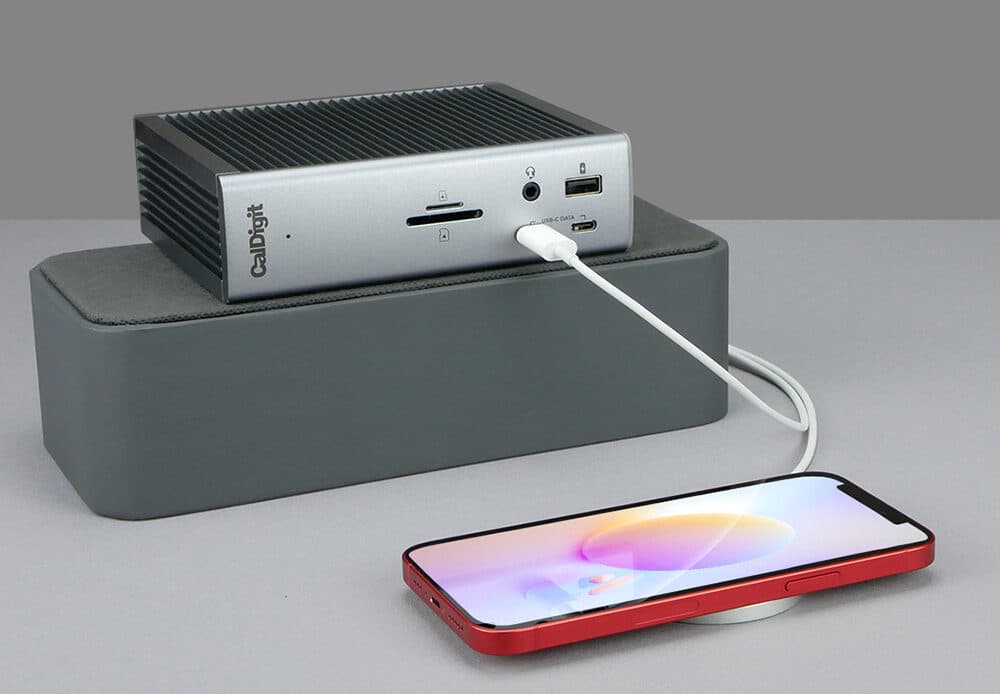
Crafted from solid aluminum with ribbed sides doubling as heat sinks, the dock feels durable yet sleek enough for professional setups seeking both form and function in one package. Reviewers praise its sturdy construction as well as practical features like removable rubber feet enabling vertical or horizontal placement tailored to desk space constraints—an elegant touch rarely seen at this level of docking station design that enhances usability alongside aesthetic appeal.
Display Support & Video Output
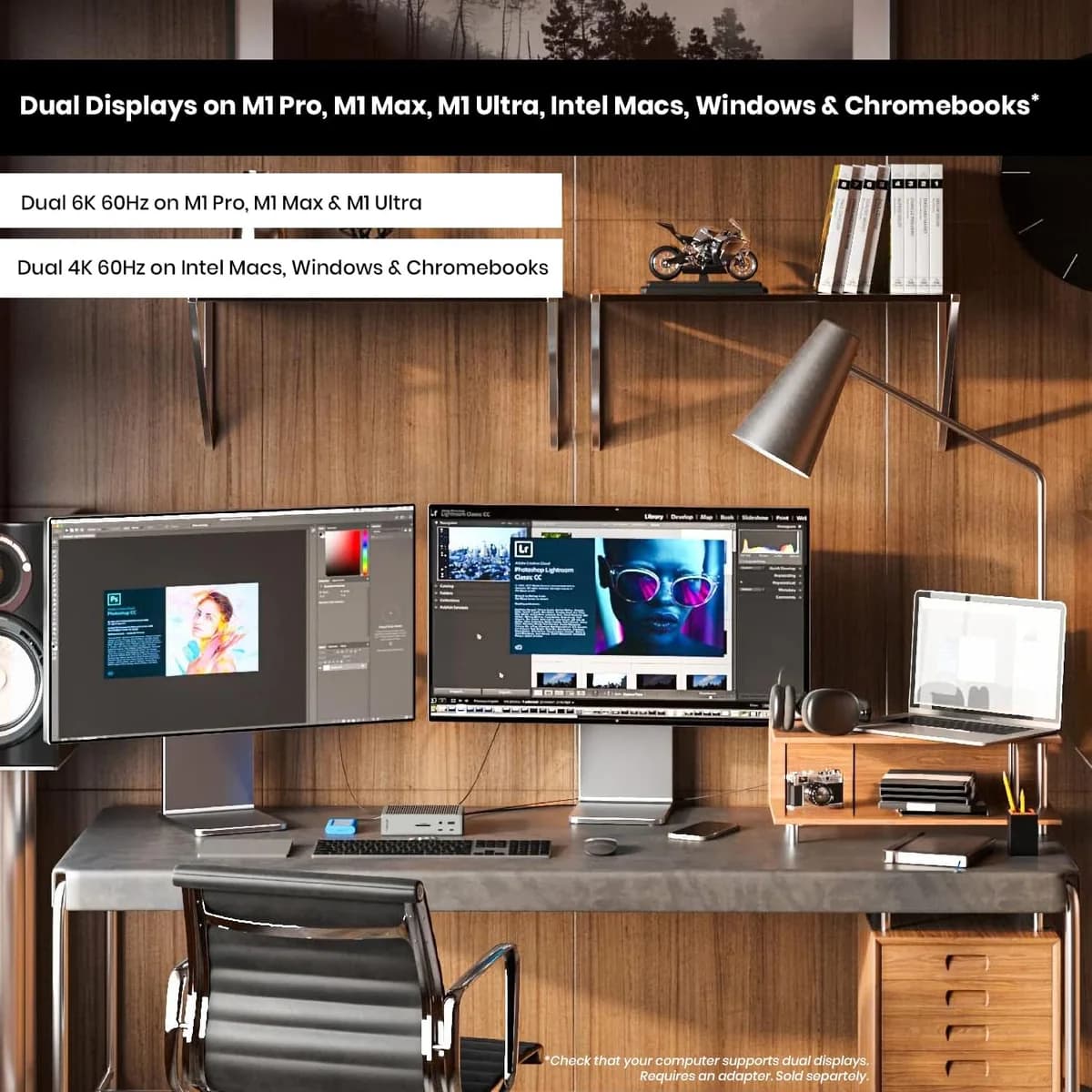
Supporting single monitors up to an eye-popping 8K @60Hz on Windows and dual 6K displays on Apple’s Pro/Max Macs showcases serious video prowess here. Native DisplayPort 1.4 output avoids reliance on adapters but requires active DP-to-HDMI dongles for HDMI screens—a slight hassle noted by reviewers craving plug-and-play simplicity across diverse monitors. Overall smooth multi-display support impresses professionals working in ultra-high resolution environments who demand crisp visuals without lag or flicker issues.
Conclusion
Wrapping up the deep dive into this dock’s arsenal, its port selection and bandwidth stand out as a fortress for connectivity enthusiasts, delivering ample room to plug in everything from ultra-fast drives to multi-display setups. The power delivery, while robust at 98W, nudges users to mind heat management during intense use—a small quirk amid otherwise solid thermal design. Experts laud the crisp DisplayPort 1.4 video output, though the absence of native HDMI nudges some toward adapters. Its aluminum build quality earns respect for durability and cooling finesse, complementing wide-ranging compatibility with hosts and peripherals that keeps workflows fluid across macOS, Windows, and Chrome OS alike. The integrated 2.5GbE Ethernet port adds a networking edge few rivals match straight out of the box. This dock suits power users craving expansive connections without compromise but may test those seeking absolute simplicity or strict portability—making it an apt centerpiece rather than a sidekick on your desk setup journey.

Feature Scores
This reflects reviews and ratings from established critics, journalists, and users who have evaluated the item. Their opinions provide a comprehensive assessment.
Performance
Reliability
4/5
Connectivity Compatibility
4/5
Latency Response
4/5
Value
Price to Quality Ratio
4/5
Warranty Coverage
4/5
Longevity Value
4/5
Design
Ergonomics
4/5
Build Quality
5/5
Portability
2/5
Health
Ergonomic Strain Reduction
4/5
Noise Emissions
4/5
Safety
Overheat Protection
3/5
Data Protection
4/5
Sustainability
Recyclability
4/5
Repairability
4/5
Experience Style
Ease of Setup
4/5
Customizability
3/5
Software Ecosystem
4/5

Specifications
This section outlines the product's key facts, covering essential features, details, dimensions, materials, and any unique characteristics that define its functionality and usability.
Performance
Value
Design
Safety
Sustainability
Experience Style

Frequently Asked Questions
11 Questions

Also Consider
2 Options

Find Yours
What is the main purpose of your external component?
Answer to find your best matches.