
Logitech MX Mechanical
Premium low-profile mechanical keyboard with seamless multi-device switching and long battery life, though pricey and limited in customization.
The Logitech MX Mechanical is a sleek, premium low-profile mechanical keyboard designed for multitasking pros craving buttery typing and effortless device juggling. Its Kailh switches deliver satisfying tactile feedback, earning nods from experts and users alike, while the dual wireless connectivity via Bluetooth and Logi Bolt receiver makes switching between three devices a breeze. The keyboard’s long-lasting 1500 mAh battery with USB-C quick charge powers through marathon sessions, though some find the backlighting sensor quirky and customization options limited by proprietary keys. With an aluminum top plate adding durability to its refined design, this board scores high on productivity charm but demands a premium price tag—worth it if seamless workflow beats modding dreams.

Find Yours
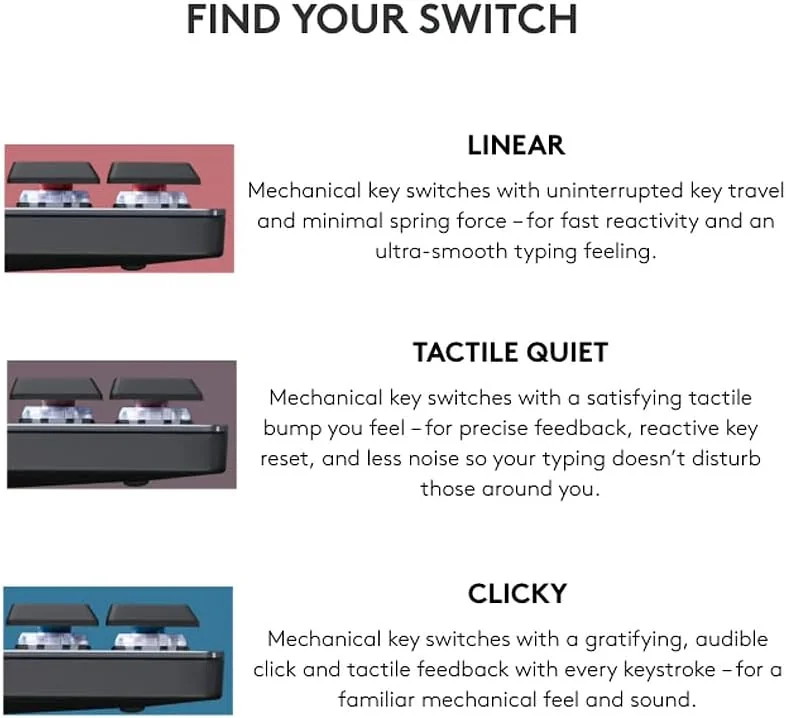
What type of keyboard mechanism do you prefer?
Answer to find your best matches.

The Field
Browse top contenders, or compare all options ranked by score and key attributes.
2 Options


The Scoreboard
Does this improve your life? Considers, health, habits, and environmental impact.
Benefits
Low-profile mechanical switches reduce wrist extension, easing strain during long typing sessions.
Tactile, low-travel switches improve accuracy and typing enjoyment compared with flat membrane keys.
Logi Flow and multi-device pairing lower cognitive load, smoothing workflows across multiple computers.
Adaptive backlighting and long battery life cut charging interruptions and maintain focus longer.
Aluminum top plate and partial recycled plastics reduce material footprint versus typical all-plastic designs.
Trade-Offs
Non-hot-swappable switches and proprietary stems make repairs or upgrades harder, increasing replacement likelihood.
Thin ABS keycaps and unique spacebar fittings wear or crack faster, complicating replacements.
No wired mode while charging forces battery cycling, potentially shortening long-term battery lifespan.
Clicky or brown switches can be louder than laptop boards, disturbing coworkers or household members.
Dependence on Logi software, Bolt receiver, and account-required options reduces user control and portability.
 Alternatives


Join the Circle
Where real meets deal
Know what's worth buying-and when.
Tips, special offers, and rewards for buying and sharing.

Publications
7 LEADING PUBLICATION REVIEWS

Avram Piltch from Tom’s Hardware highlights the Logitech MX Mechanical as a premium, low-profile mechanical keyboard that excels in typing comfort, customization, and seamless multi-device switching via Logi Flow. Praising its fast, accurate typing experience—especially with the blue switches—and robust software customization, Piltch notes the keyboard’s professional, understated design and long battery life. However, he points out drawbacks such as the non-hot-swappable switches, limited key remapping in the software, and the challenge of finding a compatible wrist rest due to the keyboard’s low height. The absence of a dedicated print screen key and the relatively loud brown switches also temper enthusiasm. While more expensive than competitors like the Akko 3098B, the MX Mechanical’s integration with Logitech’s ecosystem and solid build quality make it a strong choice for users who prioritize productivity and device switching, provided they are comfortable with its low-profile form factor and premium price.
By Avram Piltch
Eric Grevstad from PCMag highlights the Logitech MX Mechanical as a strong contender in the wireless mechanical keyboard market, especially for office productivity. He praises its comfortable, low-profile design, versatile switch options, and thoughtful features like adaptive white backlighting and multi-device connectivity. The keyboard’s build quality, including an aluminum base and recycled materials, adds to its appeal. Grevstad appreciates the customization offered by Logi Options+ software and the seamless integration with Logitech’s Flow technology when paired with compatible mice. However, he notes the MX Mechanical’s higher price compared to the Razer Pro Type Ultra, which also includes a wrist rest and boasts a longer key lifespan. While the MX Mechanical doesn’t quite surpass the Editors’ Choice winner, it remains an excellent, well-rounded keyboard with a satisfying typing experience and useful shortcuts, making it a compelling choice for professionals seeking a premium mechanical keyboard tailored for productivity.
By Eric Grevstad
RTINGS highlights the Logitech MX Mechanical as a well-built, comfortable mechanical keyboard primarily designed for office productivity rather than gaming. Praised for its solid construction, low-profile Kailh Brown switches, and clear white backlighting, it offers a smooth, quiet typing experience suitable for long sessions without wrist fatigue. Its wireless versatility is notable, supporting Logitech’s BOLT receiver and Bluetooth connections to multiple devices, though some function keys have limited compatibility on macOS, Linux, and mobile OSes. While the keyboard excels in typing comfort and build quality, its latency is only adequate for casual gaming, falling short for competitive or reaction-based play. The review also points out the keyboard’s bulkiness as a drawback for mobile use and the lack of extra features like a trackpad or volume wheel for HTPC setups. Overall, the MX Mechanical stands out as a refined productivity tool with thoughtful design but with some platform-specific limitations and modest gaming performance.
By Kelsey Linhares, Abigail Roelens, John Peroramas
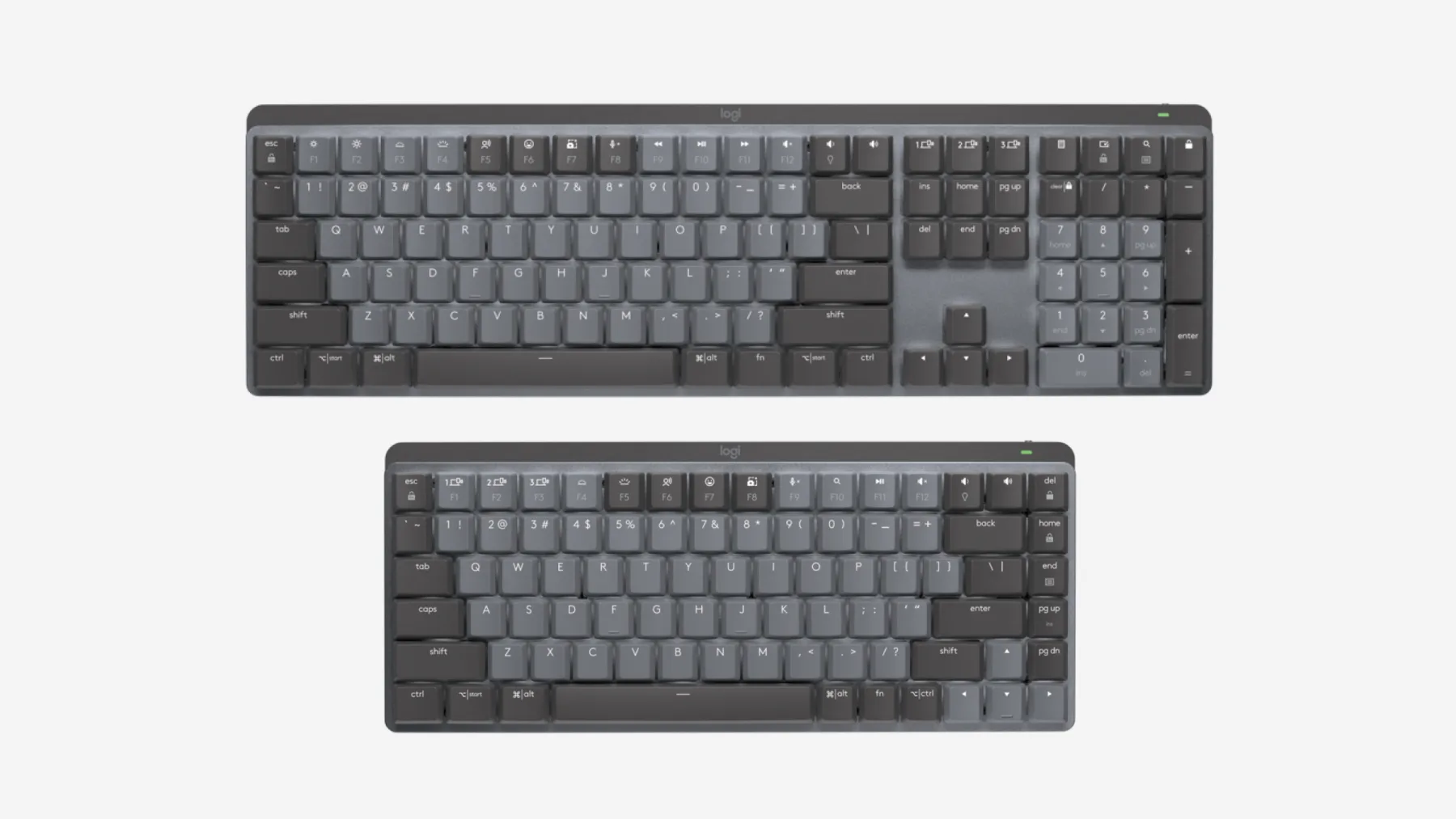
Michael Crider from PCWorld highlights the Logitech MX Mechanical as a sleek, well-designed mechanical keyboard that successfully blends the premium aesthetics and multi-device wireless features of Logitech’s MX line with satisfying low-profile mechanical switches. He praises its compact form factor, intelligent layout—including full-sized arrow keys on the Mini—and quality Cherry Low Profile switches that offer longer travel than similar designs. However, Crider expresses clear reservations about the high price point, noting it is significantly more expensive than both Logitech’s own MX Keys series and competing mechanical keyboards like the Keychron K3. He also points out drawbacks such as limited keycap customization due to unique switch stems, somewhat flimsy ABS keycaps, and relatively short battery life when using backlighting. While the keyboard delivers on performance and style for enthusiasts who value mechanical keys in a professional package, Crider advises more budget-conscious buyers to consider alternatives or wait for discounts.
By Michael Crider
Eric Vander Linden from Tom’s Guide highlights the Logitech MX Mechanical as a solid, well-built wireless mechanical keyboard that offers flexibility with multi-device switching and a choice of low-profile switch types. He appreciates its compact full-size design, good backlighting features, and respectable battery life with quick charging. However, the review strikes a measured tone, noting several drawbacks: the keyboard cannot be used in wired mode, limiting continuous use during charging; key customization is restricted and requires a Logitech account for advanced features; and there is no wrist rest or NumLock indicator. The low-profile Kailh switches provide a quieter, crisper typing experience but may feel “gritty” to seasoned mechanical keyboard users. While the MX Mechanical stands out in the wireless mechanical keyboard segment, its $170 price feels somewhat steep given these compromises. Overall, the review conveys a balanced, moderately positive sentiment with thoughtful insights into both strengths and limitations.
By Eric Vander Linden
Kerry Wan from ZDNET highlights the Logitech MX Mechanical as a thoughtfully designed, premium mechanical keyboard that successfully blends the productivity strengths of Logitech’s Master Series with the tactile feedback expertise of its gaming G-line. Praising its sturdy aluminum build, choice of three high-quality Kailh Choc V2 switches, and versatile sizing options, Wan emphasizes the keyboard’s appeal to professional users seeking a durable, satisfying typing experience. The review notes smart features like adaptive backlighting and multi-device pairing, though it points out minor drawbacks such as susceptibility of the matte keycaps to finger oil, limited tilt adjustment, and occasional input delays when switching devices. Wan also provides useful comparisons to alternatives like the Logitech G915 and Keychron K1, framing the MX Mechanical as a premium but pricey option best suited for those prioritizing build quality and typing feel over customization. Overall, the tone is measured and appreciative, recommending the keyboard for professionals who value performance and design cohesion.
By Kerry Wan
Jon Porter from The Verge highlights the Logitech MX Mechanical Mini as a thoughtfully designed, highly functional keyboard that prioritizes practicality over flashy aesthetics. Praising its solid build quality, excellent battery life, and sensible feature set, Porter positions it as a premium alternative to laptop-style membrane keyboards and competitors like the Keychron K3. The review emphasizes the keyboard’s low-profile Kailh switches, which offer a crisp typing experience familiar to laptop users, though not quite matching the feel of high-end mechanical keyboards. Porter notes some drawbacks, including limited customizability (non-hot-swappable switches, no Mac-specific keycaps), minor USB receiver latency issues, and a rattling spacebar. The keyboard’s white-only backlighting and lack of onboard key remapping storage reflect Logitech’s focus on function over form. Overall, Porter conveys a moderately positive, measured enthusiasm for the MX Mechanical Mini, recommending it as a sensible, durable choice for users seeking a reliable upgrade without the bells and whistles favored by keyboard enthusiasts.
By Jon Porter

YouTube
4 LEADING EXPERT & INFLUENCER REVIEWS
 Hardware Canucks
Hardware Canucks praises the Logitech MX Mechanical for its sturdy build, smart illumination, and versatile low-profile Kailh switches, highlighting excellent wireless performance and seamless multi-device switching via Logi Options+ software. While the clicky switches may be too loud for shared spaces, the keyboard excels in productivity and cross-platform use, though the full-size model’s battery size is a missed opportunity.
Dem Crumblies TechDem Crumblies Tech praises the Logitech MX Mechanical for its premium build, satisfying tactile quiet switches, and versatile multi-device connectivity. The adaptive Smart Illumination and customizable keys enhance usability. While the typing experience is enjoyable, the keyboard isn’t the quietest, and battery life with backlighting could be longer, making it a solid but not perfect choice for office use.
Adam Talks TechAdam Talks Tech praises the Logitech MX Mechanical for its satisfying mechanical typing experience, solid multi-device Bluetooth pairing, and smart backlighting that conserves battery life. He highlights the tactile quiet switches as a balanced choice but notes the linear switches feel too light. Criticisms include the oversized space bar and small command keys for Mac users. Overall, he finds it a versatile, reliable keyboard worth the premium price, especially for users needing seamless switching across Windows, macOS, and iPadOS devices.
Phillip R PeckPhillip R Peck praises the Logitech MX Mechanical for its impressive battery life, seamless multi-device switching via Logi Bolt, and solid overall quality. However, he criticizes the thin, brittle keycaps—especially the non-standard spacebar—and limited backlight customization. He also notes BIOS connectivity issues and software fragmentation, questioning if the premium price is justified.

Social
2 INFLUENCER REVIEWS
 sam ☆
sam ☆Sam ☆ highlights the Logitech MX Mechanical as a satisfying mechanical keyboard with tactile, quiet switches and customizable backlighting, praising its long battery life and unique lighting effects. They note a learning curve due to deeper keys and contrast it with the quieter, flatter MX Keys, which they personally prefer for Mac-like typing. Overall, Sam ☆ recommends the MX Mechanical for users who enjoy mechanical typing feedback and customizable illumination but suggests the MX Keys for those seeking quieter, flatter keys. Their balanced review offers clear insights, helping viewers choose based on typing style and preferences.
 Choxi | Tech Videos
Choxi | Tech Videos highlights their excitement about the Logitech MX Mechanical as their first mechanical keyboard, praising its sleek design, USB-C charging, and unexpected illumination feature. They emphasize the satisfying sound and convenience compared to their old keyboard’s battery hassles, expressing genuine enthusiasm throughout. Overall, Choxi clearly recommends the Logitech MX Mechanical, calling it a “definite W” and a worthy upgrade. Their positive tone and focus on practical benefits suggest it’s an excellent choice for users seeking a stylish, reliable mechanical keyboard with modern features.

Store Reviews
CUSTOMER REVIEWS FROM 1 STORE
Amazon users consistently praise the Logitech MX Mechanical for its premium build quality and satisfying tactile feedback. Reviewers highlight the keyboard’s solid, sturdy construction and appreciate the mechanical key switches that deliver a responsive and enjoyable typing experience. Many emphasize the impressive battery life, noting it lasts for weeks on a single charge and features smart power-saving functions like automatic backlight shutoff and quick reactivation through motion detection. Users enjoy the backlit keys, especially for working in low-light environments, and value that the illuminated symbols resist wear over time. The keyboard’s multi-device Bluetooth pairing and customizable keys receive positive remarks, although some users caution about the learning curve with the function row layout and recommend disabling certain keys, like the lock key, to avoid accidental presses. While most find the wireless connection reliable and seamless, a portion of reviewers report occasional Bluetooth dropouts. Opinions on noise levels vary: some appreciate the quiet yet tactile switches, while others find the keyboard a bit louder than expected. Backlighting also divides users—many like the subtle illumination, but some criticize the smart lighting’s timing and limited customization. Overall, Amazon customers consider the Logitech MX Mechanical a high-quality, compact mechanical keyboard that balances aesthetics, functionality, and durability, making it a worthwhile investment for those seeking a premium typing tool with advanced features.
4.2 Stars / Many verified reviews

Forum Reviews
CUSTOMER REVIEWS FROM 1 FORUM
Reddit users generally appreciate the Logitech MX Mechanical for its solid build, sleek design, and satisfying mechanical typing experience, particularly praising its stable wireless connectivity and long battery life. However, many express frustration with inconsistent backlighting behavior, including the inability to customize backlight timeout, and occasional sensor issues. The keyboard’s proprietary keycaps and lack of hot-swappable switches limit customization, which some find disappointing. While new users often enjoy the transition to mechanical typing, upgraders note misfires and key sensitivity challenges. Overall, the MX Mechanical is seen as a stylish, reliable keyboard with notable flaws that affect usability and customization.
Many comments

In-Depth Review

Highlights
- •Long battery lifeExtended runtime with backlight off
- •Responsive low‑profile switchesShort travel, tactile options
- •Seamless multi‑device switchingEasy‑Switch for three devices
- •Solid materials & constructionAluminum top plate for rigidity
- •Marketed as Smart IlluminationAuto backlight with proximity sensor
- •USB‑C quick chargingFast top‑up charging via USB‑C

Considerations
- •Backlight sensor quirksDelayed or unpredictable activation
- •Connectivity dropoutsOccasional Bluetooth/receiver interruptions
- •Keycap wear and spacebarABS caps oil quickly; unique spacebar
- •Non‑hot‑swappable switchesSwitches soldered; no aftermarket swap
- •Limited key programmabilityRemap restricted to select keys
- •Premium price positioningHigher cost; mixed value perception
Logitech, a titan in productivity peripherals, steps into mechanical keyboards with an offering aimed squarely at professionals and multitaskers. This keyboard boasts Kailh low-profile switches delivering crisp tactile feedback across clicky, linear, and quiet options—crafted to balance speed and comfort for extended typing sessions. Its dual wireless connectivity via Bluetooth LE and Logi Bolt receiver empowers seamless switching between up to three devices, perfect for cross-platform workflows. Power users will appreciate the long-lasting 1500 mAh battery paired with USB-C quick charging, while the mix of aluminum top plate and plastic chassis ensures durability without bulk. The keyboard’s smart illumination activates with hand proximity, blending convenience with energy efficiency, complemented by thoughtfully designed keycaps that prioritize both feel and function. Whether you’re coding late or toggling tasks across systems, this model offers nuanced features that push it beyond basic office gear—explore these facets carefully to find out if it fits your workflow like a glove.
Connectivity & Multi‑Device Switching
This keyboard shines with its dual wireless connectivity: Bluetooth Low Energy and the proprietary Logi Bolt USB receiver, ensuring robust connections across devices. Users appreciate seamless switching among up to three paired devices via dedicated Easy-Switch buttons, making multi-tasking effortless in busy setups. Although generally reliable, sporadic dropouts have been reported by some users under certain conditions—still, it remains a strong performer for professionals juggling multiple systems simultaneously.
Battery & Charging Performance
Equipped with a substantial 1500 mAh Li-Po battery and smart power management including proximity-activated backlighting, this keyboard impresses with extended runtimes—up to 15 days illuminated or 10 months unlit per manufacturer claims supported by user reports. Quick USB-C charging offers convenience; just minutes plugged in deliver hours of use—a boon for productivity junkies always on the go who hate downtime due to dead batteries.
Key Switch Performance
Dive into the world of Kailh low-profile mechanical switches offering tactile, clicky, and linear options. These provide a short travel distance of 3.2 mm, delivering quick actuation that appeals to typists seeking precision without fatigue. The switches are praised for their satisfying feedback but some users note they can feel slightly mushy or overly sensitive initially. While not hot-swappable, these proprietary switches lock you in post-purchase yet still offer an enjoyable typing experience with a notable balance between sound and tactility.
Build Quality & Materials
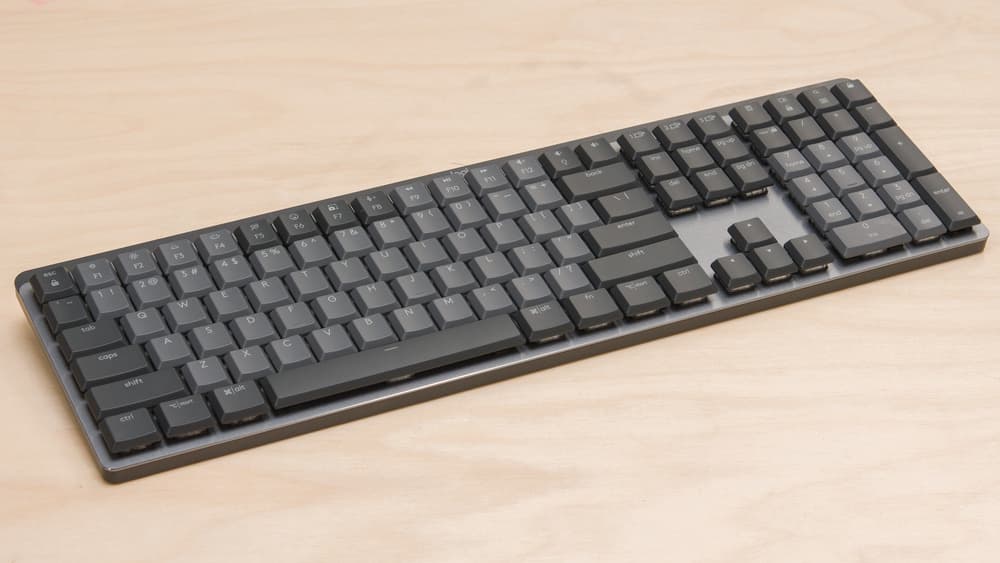
The blend of an aluminum top plate atop sturdy plastic chassis lends impressive rigidity without excess weight (~828 g). Despite mostly solid construction praised by reviewers, concerns linger around ABS keycaps which show wear over time and occasional internal fastener looseness affecting durability perception. This mix reflects thoughtful material choices balancing strength with sustainability efforts like incorporating recycled plastics while meeting professional aesthetics expected from office-grade hardware.
Conclusion
Wrapping up the key insights, this keyboard delivers responsive Kailh low-profile switches that cater to both speed and comfort but lock users into their initial choice due to soldered design. Its dual wireless connectivity with Logi Bolt receiver and Bluetooth LE facilitates fluid multi-device juggling, though occasional dropouts hint at room for improvement. The robust 1500 mAh battery paired with USB-C quick charging impresses in endurance and convenience. Structurally, the blend of an aluminum top plate with a plastic chassis balances sturdiness against weight considerations. While its smart illumination reacts cleverly to hand proximity, some backlight quirks remain unresolved. Keycaps offer smooth typing surfaces yet suffer from wear and limited replacement options due to proprietary sizing. This setup suits professionals who prioritize workflow efficiency over extensive customization—offering a polished experience where seamless switching and thoughtful design meet practical durability without flashy frills or modding flexibility.

Feature Scores
This reflects reviews and ratings from established critics, journalists, and users who have evaluated the item. Their opinions provide a comprehensive assessment.
Performance
Key Switch Responsiveness
4/5
Typing Accuracy
4/5
Build Durability
4/5
Connectivity Reliability
4/5
Battery Life
5/5
NKRO Support
TBD
Firmware Reliability
4/5
Value
Price-to-Features Ratio
4/5
Warranty and Support
4/5
Resale Value
TBD
Design
Ergonomics
4/5
Layout Variety
4/5
Keycap Quality
3/5
Aesthetics and Finish
4/5
Backlighting and Visuals
4/5
Portability
3/5
Health
Wrist Support Availability
2/5
Noise Level
4/5
Materials Safety
4/5
Safety
Electrical and Battery Safety
4/5
Wireless Security and Privacy
4/5
Sustainability
Recyclability and End-of-Life
4/5
Repairability and Modularity
2/5
Sustainable Materials Use
4/5
Energy Efficiency
4/5
Experience Style
Customization and Programmability
3/5
Ease of Setup and Use
4/5
Hot-Swap and Typing Feel Customization
2/5

Specifications
This section outlines the product's key facts, covering essential features, details, dimensions, materials, and any unique characteristics that define its functionality and usability.
Performance
Value
Design
Safety
Sustainability
Experience Style

Frequently Asked Questions
8 Questions


Find Yours
What type of keyboard mechanism do you prefer?
Answer to find your best matches.