

Canon PIXMA TR4720
Compact and versatile all-in-one printer with vivid prints and duplexing, but slower speeds and ink costs.
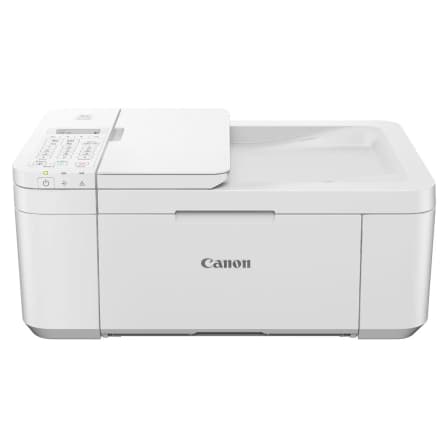
The Canon PIXMA TR4720 is a compact all-in-one printer designed for home offices craving vibrant photos and sharp text without splurging. Perfect for casual users juggling documents, it boasts a 20-sheet auto document feeder and automatic duplex printing, rare perks at this price point. Experts applaud its vivid color output but warn of sluggish speeds and pricey ink refills that chip away at value. Users love the easy wireless setup yet grumble about occasional connectivity quirks and noisy operation. With modest paper capacity and build quality, it’s a versatile budget pick—though more user feedback would sharpen the full picture before final verdicts emerge.


Find Yours
What will be your primary use for the printer?
Answer to find your best matches.

The Field
Browse top contenders, or compare all options ranked by score and key attributes.
3 Options



The Scoreboard
Does this improve your life? Considers, health, habits, and environmental impact.
Benefits
Auto two-sided printing cuts paper consumption—unlike many budget models—reducing clutter and resource use.
20-sheet ADF plus fax automates multi-page scans—rare in budget models—lowering repetitive strain and friction.
Pigment black and dye color inks give sharper text and photos, easing reader eye strain.
ENERGY STAR and EPEAT Silver reduce electricity demand and associated emissions, supporting conscience-friendly use.
Manufacturer-refurbished unit extends device life, lowering manufacturing waste and planetary resource extraction.
App, AirPrint and cloud options reduce friction, easing workflows and stress in home offices.
Trade-Offs
Two-cartridge design and low page yields—unlike high-yield eco-leaders—force frequent replacements, creating plastic and chemical waste.
Slow print speeds and noticeable mechanical noise increase frustration and interrupt focused work sessions.
Single-sided ADF plus CIS scanner causes manual page flips and soft detail loss during scans.
Lightweight construction and occasional jams can increase maintenance time and potential early device turnover.
 Alternatives


Join the Circle
Where real meets deal
Know what's worth buying-and when.
Tips, special offers, and rewards for buying and sharing.

Publications
3 LEADING PUBLICATION REVIEWS

William Harrel from PCMag highlights the Canon PIXMA TR4720 as a solid, entry-level all-in-one inkjet printer that excels in producing attractive photos and clear text, making it well-suited for family and home office use. He praises its inclusion of a 20-sheet automatic document feeder, a feature often missing in budget models, and notes its compact size compared to some competitors. However, Harrel points out several drawbacks, including a small paper tray, slow print speeds relative to some rivals, and a dated control panel lacking a color touchscreen. The printer’s two-cartridge ink system leads to higher running costs, especially for color prints, limiting its appeal to low-volume users who print around 100 pages monthly. Despite these limitations, the TR4720 delivers reliable, high-quality output and convenient wireless connectivity, making it a dependable choice for those prioritizing print quality over speed or ink economy.
By William Harrel
Lesley Robinson from GearLab highlights the Canon PIXMA TR4720 as a printer that excels in photo and graphic printing, delivering rich, vibrant colors and impressive detail that surpass many competitors. The printer realistically captures skin tones and textures, producing stunning, high-resolution images that hold up under close scrutiny. However, Robinson’s review conveys a cautious tone overall, emphasizing significant drawbacks: slow printing speeds, poor text quality with inconsistent blacks and smearing, and notably high operating costs—nearly four times the average per-page ink expense. While setup and usability are straightforward, the small, non-adjustable display and sluggish performance limit its appeal. Robinson suggests the TR4720 is suitable only for users prioritizing exceptional photo output over speed, text clarity, or cost efficiency, recommending other models for a more balanced home printer experience. This nuanced review balances praise for photographic excellence with clear warnings about practical limitations.
By Lesley Robinson
RTINGS highlights the Canon PIXMA TR4720 as a budget-friendly all-in-one inkjet printer that excels in producing sharp, detailed documents and vibrant photos with a wide color gamut. Its scanner includes an automatic document feeder (ADF) and adjustable hinges, accommodating thicker items, though the ADF is notably slow and scan quality is mediocre with overexposed colors and loss of fine details. While the printer offers decent connectivity options and a feature-rich mobile app, it suffers from very low page yields, resulting in high cost-per-print and frequent cartridge replacements. Printing speeds are slow, and maintenance can be cumbersome, especially when clearing paper jams or dealing with clogs from infrequent use. Build quality feels cheap, and some design choices limit ease of access. Overall, the TR4720 is suitable for casual home photo printing but is a poor fit for small office environments or heavy use, where alternatives like Epson’s XP-4200 offer better value and reliability.
By Dagobiet Morales Alfaro; Thomas Szwedska; Yannick Khong

YouTube
7 LEADING EXPERT & INFLUENCER REVIEWS
 Printer Insider
Printer Insider praises the Canon PIXMA TR4720 for its convenient Auto Document Feeder and built-in fax, making it ideal for scanning multi-page documents and business use. However, they note its bulkier size and less sharp print quality compared to the MG3620, especially for photos, which appear noisier and overexposed. The TR4720’s easier wireless setup and larger scan size add value, but photo print quality and price may deter heavy photo users.
Copy Print ScanCopy Print Scan demonstrates the Canon PIXMA TR4720’s Auto Document Feeder for efficient multi-page scanning, highlighting easy wireless setup via the Canon PRINT app and convenient options to save scans as single PDF files or separate JPEGs. The review is practical and focused, emphasizing straightforward scanning without notable drawbacks.
Tricks Tips FixTricks Tips Fix provides a clear, step-by-step walkthrough of setting up the Canon PIXMA TR4720, emphasizing ease of cartridge installation, paper loading, and wireless connection. The tutorial is practical and user-focused, highlighting helpful tips for troubleshooting and scanning, with a calm, instructional tone that balances thoroughness without hype.
Printer ReviewPrinter Review finds the Canon PIXMA TR4720 a compact, affordable 4-in-1 inkjet suited for light home or small office use, praising its vibrant photo and graphic quality with accurate skin tones. However, they criticize its slow speed, high ink costs, and underwhelming text print quality, making it less ideal for heavy document printing.
Erin LawrenceErin Lawrence praises the Canon PIXMA TR4720 for its clear, high-quality printing, easy setup via the Canon PRINT Inkjet/SELPHY app, and versatile features like two-sided printing and photo capabilities. However, she criticizes its bulky design with awkward flip-out trays and limited scanning options, noting it’s best suited for home offices with ample space.
YayDay Paper Co.Amber Kemp Gerstel from YayDay Paper Co. praises the Canon PIXMA TR4720 for its solid print quality on thinner papers and versatile materials like fabric and sticker paper, highlighting its Auto Document Feeder as a plus for multi-page tasks. She notes some faint lines and less vibrant colors on thicker stock, and points out ink costs can be high without the Canon PIXMA Print Plan subscription. Overall, it’s a good budget-friendly option for crafters with moderate printing needs.
USP REVIEWUSP REVIEW highlights the Canon PIXMA TR4720 as a budget-friendly all-in-one printer excelling in vibrant, high-quality photo prints and ease of use. While praised for its simple two-cartridge system, USB and Wi-Fi connectivity, and convenient ADF, the reviewer notes slower print speeds, higher ink costs, lack of duplex scanning in the ADF, and no direct USB drive printing as key limitations.

Forum Reviews
CUSTOMER REVIEWS FROM 1 FORUM
Reddit users have mixed feelings about the Canon PIXMA TR4720. Many appreciate its affordability, compact design, and versatile all-in-one functionality, including wireless connectivity, auto duplex printing, and decent print quality for casual home use. The printer is praised for easy setup and energy efficiency, making it suitable for light to moderate tasks. However, several users report significant frustrations with connectivity issues, limited app functionality, poor display visibility, and high ink consumption. Performance inconsistencies, such as printing defects and difficulty handling different paper sizes, also detract from the experience. Overall, it is seen as a budget-friendly option with notable compromises, especially by those upgrading from more robust models.
Many comments

In-Depth Review

Highlights
- •Vivid photo and clear text printingVivid photos and crisp text.
- •Auto document feeder (ADF)20‑sheet ADF for multi‑page scanning.
- •Automatic two‑sided (duplex) printingAuto duplex saves paper on letter.
- •Mobile and wireless printing supportApp, AirPrint and Mopria connectivity.
- •Compact desktop footprintSmall size fits tight spaces.
- •Ink subscription savings (PIXMA Print Plan)Manufacturer claims up to 70% savings.

Considerations
- •High running ink costsTwo‑cartridge system, low page yields.
- •Slow printing and ADF speedModest ppm and slow ADF.
- •Noisy operation and flimsy buildAudible printing and cheaper‑feeling parts.
- •Scanning quality limitationsOverexposed scans and lost fine detail.
- •Setup and connectivity issuesOccasional wireless hiccups and app limits.
- •Limited paper handling capacity100‑sheet tray and single‑sided ADF.
While detailed user feedback on this Canon model remains limited, early impressions suggest it stands out as a budget-friendly all-in-one geared toward home offices and casual users. Known for its vivid photo printing with pigment black and dye color inks, this printer aims to deliver sharp documents alongside eye-catching images—an appealing balance in its price range. It features a 20-sheet auto document feeder and automatic duplexing, uncommon perks that help streamline multitasking and save paper without breaking the bank. However, expect modest print speeds around 8.8 ppm black/4.4 ppm color, paired with some quirks like occasional noise and a compact but somewhat fragile build. Wireless setup through an intuitive app rounds out the package for those seeking convenience over power-user performance. If you’re weighing print quality against speed or scanning finesse against ease of use, keep reading—there’s plenty to unpack before deciding if this model fits your workflow needs perfectly or merely gets close enough for comfort.
Paper Handling & Duplexing
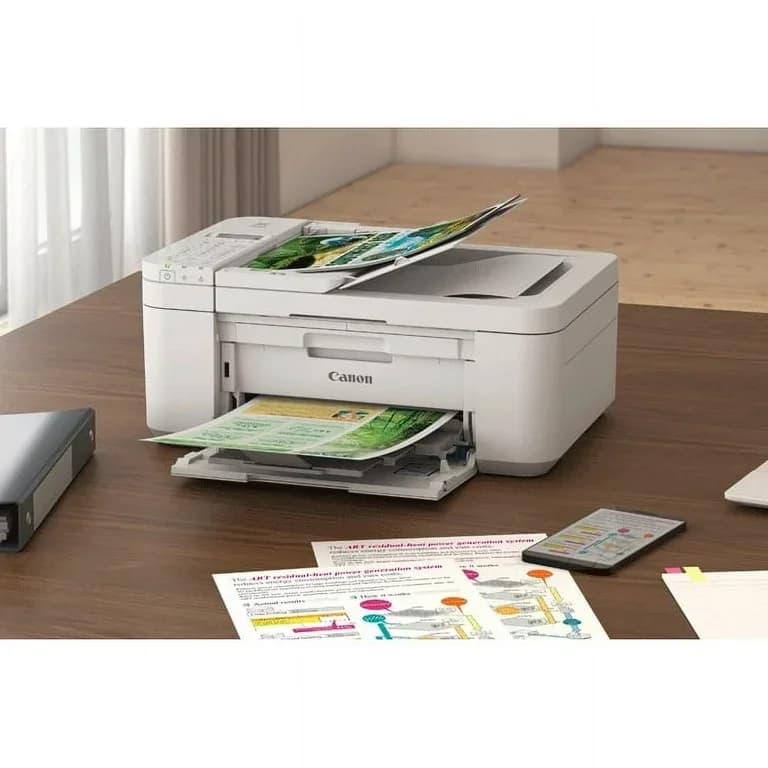
The Canon shines with practical paper management thanks to a 100-sheet input tray and automatic duplex printing that cuts paper waste in half—a win both environmentally and financially! The inclusion of a single-sided 20-sheet Auto Document Feeder (ADF) streamlines multipage scanning but moves at glacial speed compared to pricier models’ duplex ADFs; still, it’s great for light office tasks needing quick document turnaround without constant reloading hassles.
Scanning Performance
Scanning gets respectable marks via the flatbed plus an efficient albeit slow single-sided ADF capable of handling legal-sized documents—a boon for small offices juggling stacks of paperwork. Optical resolution tops out at 600 x 1200 dpi with decent color depth; however, scan results sometimes suffer from overexposure or loss of fine details according to user feedback—not quite museum-quality digitization but solid enough for everyday needs alongside convenient mobile app integration.
Print Quality
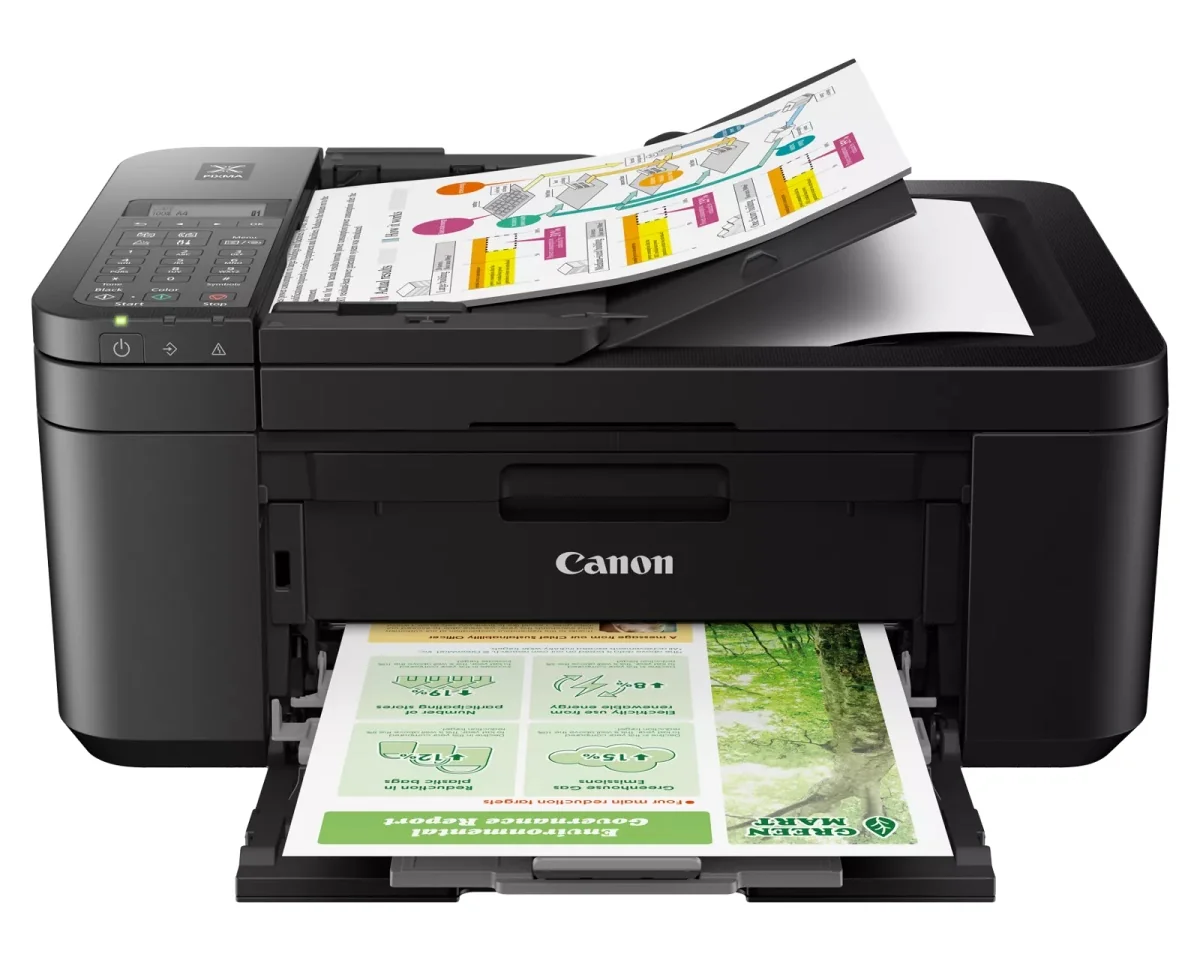
When it comes to print quality, this printer plays a colorful tune with its hybrid ink system, blending pigment black for crisp text and dye-based color for vibrant photos. Experts highlight the sharp text and impressive photo fidelity, though some users note occasional graininess in images. While borderless printing up to 8.5" x 11" is a neat trick, photo purists might find the colors leaning warmer than expected. Still, it's clear that delivering vivid output remains one of this model's strongest suits.
Print Speed
Speed demons beware: this printer isn’t winning any drag races with its modest 8.8 ppm black and 4.4 ppm color speeds. Reviewers consistently mention a slower pace compared to peers, making batch jobs feel like an eternity—especially when duplexing or using the ADF for multi-page scans. Quiet mode helps tame noise but adds patience-testing delays too. So while not built for hustle-heavy workloads, casual home use will appreciate its steady if unhurried rhythm.
Conclusion
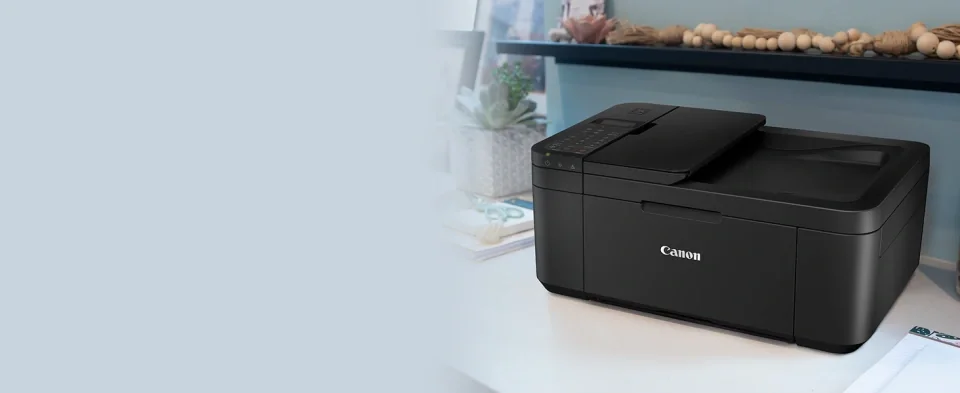
Real-world impressions remain modest, but enough emerges to sketch a balanced picture. The print quality shines with vivid photos and sharp text, appealing especially to casual creatives rather than speed demons. Speaking of pace, its print speed is leisurely, making batch jobs test patience more than productivity. On the plus side, paper handling impresses with automatic duplexing and a 20-sheet ADF—features that save time and paper in light office settings. Scanning performance holds steady but won’t dazzle; expect occasional overexposure and missed details from the single-sided feeder. Build quality leans toward plastic fragility, paired with a noisy operation that’s hard to ignore during longer runs. Wireless setup is generally smooth via app, though connectivity hiccups do pop up now and then. This printer fits those who prize image fidelity and compact convenience over speed or heavy lifting—a tidy package for home offices willing to trade rapid-fire output for solid versatility without breaking the bank on ink or features.

Feature Scores
This reflects reviews and ratings from established critics, journalists, and users who have evaluated the item. Their opinions provide a comprehensive assessment.
Performance
Print Quality
4/5
Print Speed
2/5
Reliability
3/5
Duty Cycle
2/5
Value
Purchase Price
4/5
Operating Cost
2/5
Consumables Availability
4/5
Design
Form Factor
4/5
Build Quality
3/5
User Interface Design
3/5
Health
Ink Toxicity
3/5
Emissions During Printing
3/5
Allergen Risk
3/5
Safety
Electrical Safety Compliance
4/5
Hot Surface Risk
4/5
Mechanical Safety
3/5
Sustainability
Cartridge Waste
2/5
Energy Efficiency
4/5
Recyclability Programs
3/5
Experience Style
Ease of Setup
4/5
Connectivity Options
5/5
Feature Richness
4/5

Specifications
This section outlines the product's key facts, covering essential features, details, dimensions, materials, and any unique characteristics that define its functionality and usability.
Performance
Value
Design
Sustainability
Experience Style

Frequently Asked Questions
8 Questions

Also Consider
2 Options


Find Yours
What will be your primary use for the printer?
Answer to find your best matches.


